Download
01Download videos and full playlists up to 4K. Metadata, thumbnails, and subtitles are embedded automatically — no account, no browser extension.
45 professional tools for video, audio, image, and PDF. 100% on-device processing. Zero cloud uploads. One native Mac app.
ClearCut is a native macOS application that combines 45 professional media processing tools into a single app. It covers four categories: 15 video tools (compress, convert, trim, crop, merge, rotate, speed adjust, caption, thumbnail, resize, watermark, subtitles, reverse, mute, and download), 10 audio tools (extract, convert, trim, merge, normalize, reverse, speed, fade, volume, and metadata editing), 8 image tools (compress, convert, resize, crop, GIF maker, background removal, watermark, and rotate), and 10 PDF tools (compress, merge, PDF to images, images to PDF, watermark, encrypt, split, rotate, extract pages, and decrypt). All processing runs entirely on your Mac using FFmpeg and Apple's native frameworks. Files never leave your device — there are no cloud uploads, no accounts required, and no third-party servers involved. ClearCut is built with SwiftUI and runs natively on both Apple Silicon and Intel Macs running macOS 13.0 (Ventura) or later. It is available on the Mac App Store with a free tier that includes all 45 tools (limited to 3 files per day) and a one-time Lifetime license for $24.99 that unlocks unlimited daily files, batch processing, all formats, and 4K video downloads.
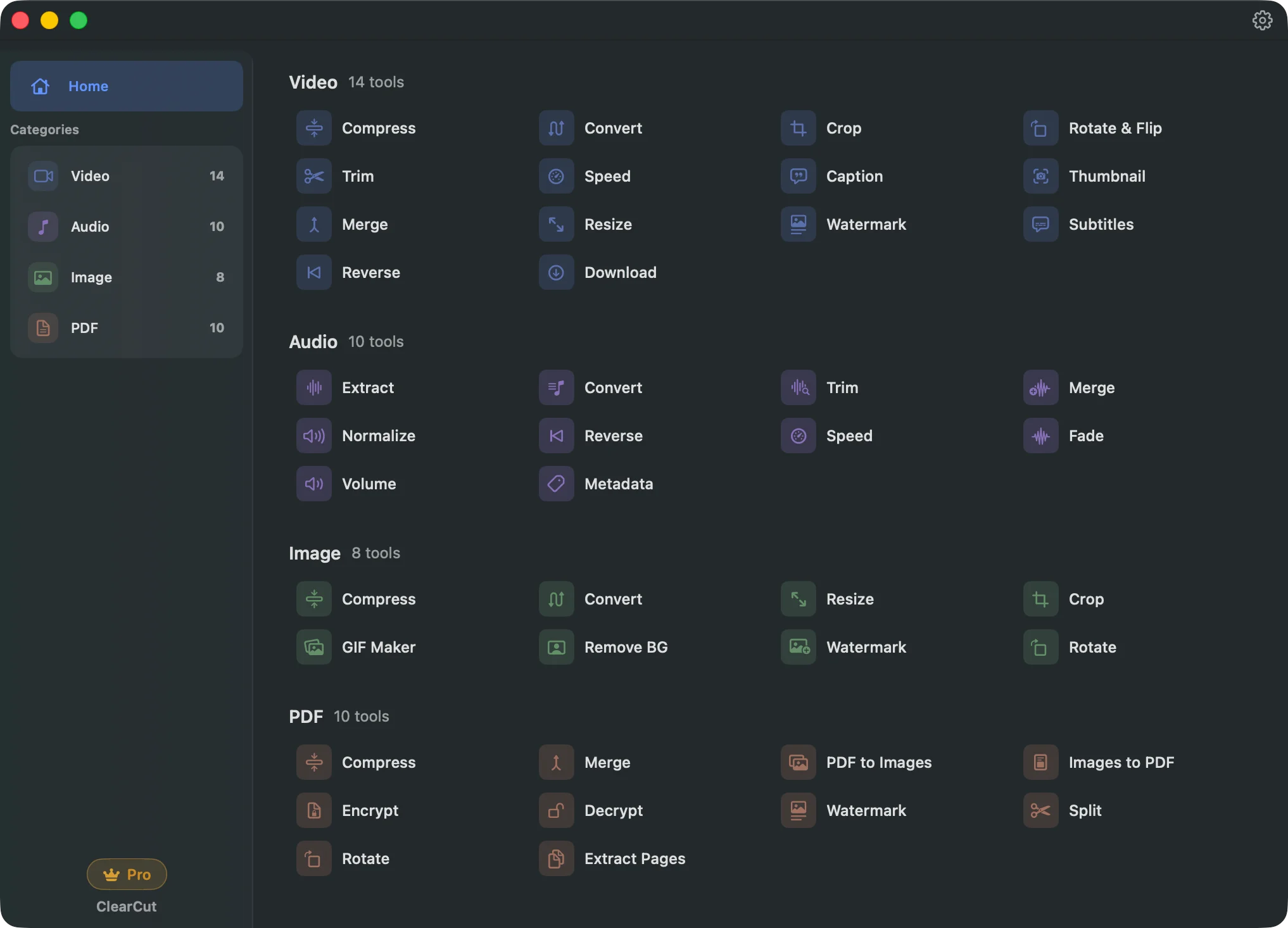
Pick a category. See the tools that ship with the most thought.
Edit, convert, and download without leaving your Mac.
FFmpeg's full power, without the command line. Shrink a 4K export, cut a frame-accurate segment, burn subtitles with real typographic control, or pull a high-res thumbnail. Fourteen tools that respect your timeline.
Download videos and full playlists up to 4K. Metadata, thumbnails, and subtitles are embedded automatically — no account, no browser extension.
Burn SRT or ASS subtitles directly into your video, or embed them as toggleable tracks. Full typography control: font, size, color, outline, position.
Shrink video files up to 90% without losing watchable quality. CRF and codec control for power users, sensible presets for everyone else.
How does ClearCut work? Download from the Mac App Store, drop your files, and process locally in seconds.
Get ClearCut from the Mac App Store. No account, no setup wizard, no configuration.
Drag a video, audio file, image, or PDF onto the app. ClearCut handles all four categories natively.
Processing runs on your Mac. Files never leave the device. Batch mode whenever you need it.
Every menu, tooltip, tool name, error message, and keyboard shortcut is localized. macOS system language switches ClearCut instantly.
ClearCut is fully localized in 34 languages: English, Arabic, Catalan, Chinese (Simplified), Chinese (Traditional), Croatian, Czech, Danish, Dutch, Finnish, French, German, Greek, Hebrew, Hindi, Hungarian, Indonesian, Italian, Japanese, Korean, Malay, Burmese, Norwegian, Polish, Portuguese, Romanian, Russian, Slovak, Spanish, Swedish, Thai, Turkish, Ukrainian, Vietnamese.
Use all 45 tools free, up to three files a day. Unlock unlimited batch, all formats, and 4K downloads with a one-time license.
ClearCut is free to use with all 45 tools, limited to 3 files per day on the free plan. A lifetime license is available for a one-time payment of $24.99 with free updates included. All plans include all 45 tools. Pro removes the daily file limit and unlocks unlimited batch processing, all file formats (MKV, WebM, FLAC, HEIC, and more), 4K video downloads with playlist support, and watermark-free GIF output.
| Feature | Free ($0) | Lifetime ($24.99) |
|---|---|---|
| All 45 tools | Yes | Yes |
| Daily file limit | 3 files per day | Unlimited |
| Batch processing | 1 file at a time | Unlimited |
| File formats | Common (MP4, MOV, MP3, PNG, PDF) | All formats |
| Video downloads | 720p | 4K + playlists |
| GIF watermark | Yes | No watermark |
Perfect for quick, one-off media tasks.
Pay once, own forever. Free updates.
Prices in USD. Managed by the App Store.
Yes. All 45 tools - across video, audio, image, and PDF - are available for free with no account or sign-up required. The free tier lets you process up to 3 files per day, one file at a time, using common formats like MP4, MOV, MP3, PNG, and standard PDFs, with video downloads up to 720p. There are no feature lockouts and no watermarks on output files except GIFs. You only need a Pro plan if you want unlimited daily files, batch processing (multiple files at once), access to all file formats including MKV, WebM, FLAC, and HEIC, 4K video downloads with playlist support, and watermark-free GIF output. A one-time Lifetime license is $24.99 with free updates included. All purchases are handled through the Mac App Store.
Never. ClearCut processes everything locally on your Mac using FFmpeg and Apple's native frameworks. Your files never leave your computer — there are no cloud uploads, no remote servers, and no network requests made during processing. This applies to every tool across all four categories: video, audio, image, and PDF. Because processing runs on your own hardware (CPU and GPU), ClearCut works without an internet connection and imposes no file size limits beyond your Mac's available storage. There is no account system, no login, and no telemetry collecting data about your files. This local-only architecture was a deliberate design choice to ensure complete privacy and data security, making ClearCut suitable for professionals working with sensitive or confidential media files.
ClearCut handles four categories of media with 45 professional tools total. Video (15 tools): compress, convert, trim, crop, merge, rotate and flip, speed adjustment with pitch-corrected audio, text captions, thumbnail extraction, resize, watermark, SRT/ASS subtitle burning, reverse, mute (strip audio track), and video download via yt-dlp. Audio (10 tools): extract audio from video, convert between formats, trim, merge, LUFS loudness normalization with presets for podcast, music, and broadcast, reverse, speed with pitch correction, fade in/out, volume adjustment with dB precision, and ID3 metadata editing including cover art. Image (8 tools): compress, convert, resize, crop, animated GIF creation from video or image sequences, AI background removal using Apple Vision framework, watermark, and rotate. PDF (10 tools): compress, merge, PDF to images, images to PDF, watermark, AES encryption with permission controls, split, rotate, extract pages, and password-based decryption.
ClearCut supports over 30 file formats across all categories. Video: MP4, MOV, AVI, MKV, WebM, FLV, and more, with codec options including H.264, HEVC (H.265), and VP9. Audio: MP3, AAC, WAV, FLAC, OGG, and M4A, with control over bitrate and sample rate. Image: PNG, JPEG, TIFF, BMP, GIF, HEIC, and WebP. PDF: all standard PDF files. The free tier covers the most commonly used formats (MP4, MOV, MP3, PNG, JPEG, and standard PDFs). Pro unlocks the full format library including professional and less common formats like MKV, WebM, FLAC, HEIC, and OGG. Format conversion works across categories — for example, you can extract audio from a video file and export it as MP3, FLAC, or WAV.
No setup at all. Just install from the Mac App Store and start using it immediately. ClearCut bundles everything it needs. No configuration, no accounts, no additional downloads.
ClearCut requires macOS 13.0 (Ventura) or later. It runs natively on both Apple Silicon and Intel Macs.
Yes. Pay once and you own ClearCut Pro forever. No recurring charges, no expiration. All future updates are included at no extra cost.
We're focused on delivering the best macOS experience first. Windows and iOS versions are on our roadmap. Join our mailing list for updates!